Simple and Secure Distribution of Your Public PGP Key
If you have basic questions about PGP encryption, you can find more information here.
With PGP, you always have two parts of a key pair: the public key and the private key.
The public key is your publicly available key, which you should make accessible to others whenever possible. The sender of a message uses your public key to encrypt messages addressed to you.
If you use PGP but a sender does not know your public key, that person can search for it on public key servers using your email address, provided that you have published your public key there.
However, this method of key distribution requires manual verification by the person who wants to send you an encrypted message. In addition, public key servers allow keys to be uploaded for third-party email addresses. Therefore, distributing public keys via public key servers can be considered a weakness in PGP. It is inconvenient for users, and in theory anyone can create and publish keys for others.
For these reasons, there is a need to improve the management of your public PGP key.
mail.ch relies on OPENPGPKEY and its own HKP and WKD servers for security reasons
OPENPGPKEY
OPENPGPKEY is a relatively new approach to making key exchange more secure and easier for you (OPENPGPKEY draft of the IETF).
Via a DNS query directly to the mail.ch DNS servers, anyone worldwide can retrieve your public key and, using DNSSEC, verify that it has not been tampered with.
HKP Server
HKP is the same protocol used by public PGP key servers. Operating a dedicated HKP server is therefore fully compatible and offers many advantages.
Through an HKP request directly to the mail.ch HKP server (hkps://hkp.mail.de), anyone worldwide can retrieve your public key. This protocol is encrypted (HTTPS), so no one can eavesdrop or modify the key during transmission.
WKD Server
Web Key Directory (WKD) is a method that can be easily integrated into email programs and allows straightforward access to public keys (WKD draft by W. Koch).
In all cases, it is ensured that only you, as the owner of your public key, can publish it, since the DNS servers as well as the HKP and WKD servers are operated by mail.ch.
As a mail.ch customer, you can also delete your public keys at any time or replace them with new ones. This is not possible with public key servers, which often contain countless outdated, unused, or incorrect public keys.
An email program that supports PGP can now retrieve your public key directly from mail.ch via OPENPGPKEY, HKP, or WKD.
Using these three methods, you can publish the respective public key for your mail.ch email address and for any alias addresses created within your account.
You can conveniently publish your public keys in just a few steps:
- Log in to the login page using your credentials and navigate to the settings by moving your mouse to the gear icon in the top right corner and clicking "Settings".
- Select "Messages" in the top bar and click "PGP Keys" in the left menu.
- All email addresses associated with your account will be listed there.
- Click on the desired mail.ch email address or alias address.
- If no public key has yet been assigned to this address, click "New". If you have already assigned one, click "Edit (pencil icon)".
- Check the appropriate box:
"Publish this public key in the mail.ch DNS system via OPENPGPKEY"
and/or
"Publish this public key on the mail.ch internal HKP key server"
and/or
"Publish this public key on the mail.ch internal WKD key server" - Click "Save".
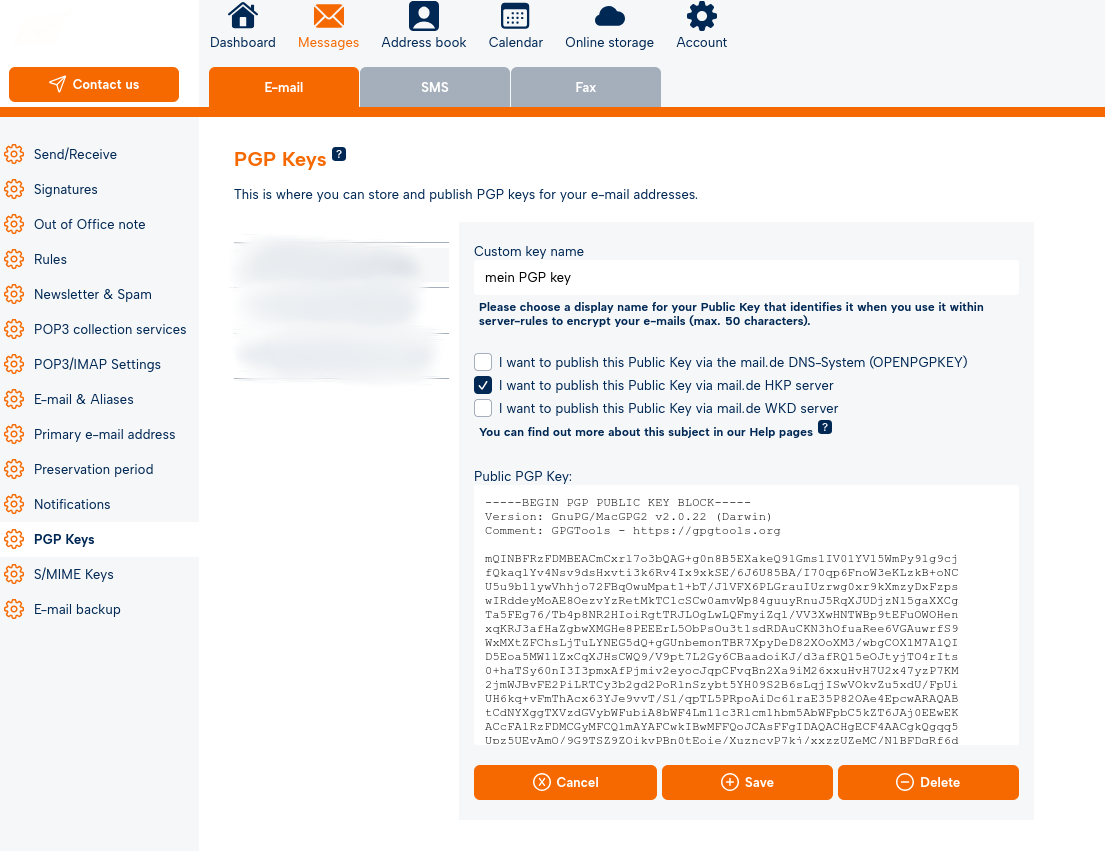
If you want to remove a public key from the mail.de system, simply uncheck the corresponding box and click "Save".
If you delete your public key, it will automatically be removed from the mail.de DNS system, the mail.de HKP server, and the WKD server.
To replace an old public key with a new one, simply remove the old key, paste the new key into the text field, and click "Save".

